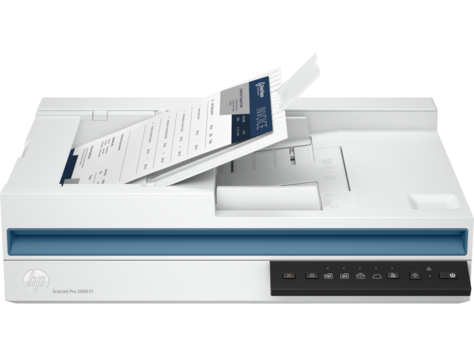
| Model | 20G05A | | Scanner type | Scanner type ADF; CIS scanning technology; Flatbed
Scan file format For text and image pages: PDF, JPEG, PNG, BMP, TIF, Text(TXT), Rich Text(RTF), SEARCHABLE PDF, PDF/A, Word(DOC), Word(DOCX), Excel(XLS), Excel(XLSX), CSV
Scan resolution, optical Up to 600 dpi (color and mono, ADF); Up to 1200 dpi (color and mono, flatbed)
Duty cycle (daily) Recommended daily duty cycle: 1500 pages (ADF)
Bit depth 24-bit (external), 48-bit (internal)
Levels of grayscale 256
Multifeed detection No
Scan size, maximum 216 x 297 mm
Media types Paper (banner, inkjet, photo, plain), envelopes, labels, cards (greeting, index)
Scan input modes Scan front-panel function : Save as PDF, Save as JPEG, E-mail as PDF and Send to Cloud. HP Scan in Win OS, HP Easy Scan/ICA in Mac OS and third parties applications via TWAIN.
Scanner advanced features One pass duplex scanning; Configurable Scan shortcuts with HP Scan (included): OCR; Auto exposure; Auto threshold; Auto detect colour; Background smooth/removal; Auto detect size; Straighten content; Enhance content; Auto orient; Multicolour dropout; Edge erase; Blank page options: Delete Blank Page, Blank Page Detection Sensitivity, Zonal Blank Detect; Merge pages; Document separation options: Zonal Text Separation, Barcode Separation, Blank Page Separation (Front/Back/Both/Any side selection), Add Page Separator Manually; Auto Feed; Show Viewer After Scan and Post Scan Operations are: Mark the image for Deletion, Rotate option, Move Left/Right, Create/Delete New Selection, Save as Scan Area, Manual Straighten option, Drag and Crop, Undo Options, image - Basic Zoom Slider, Open in Zoom Window(Zoom, Crop, Rotate) ; Background Clean-up options: Clean-up Background, Remove: make white, Smooth: make consistent, Remove Holes, Multi-Streaming; Single zone Selection for Zonal OCR, Barcode and QR Code; PDF options: PDF Security Settings (Applicable for PDF and Searchable PDF), Password Security & Document Permission Settings, PDF – iHQC compression, File Size/Quality Slider; TIFF Compression Options: for Gray or Color: Uncompressed/LZW/Jpeg-Tiff, for BW: Uncompressed/LZW/Tiff G3/Tiff G4; File Name Options: Base Name, Date, Time, Document Counter, Barcode Value, Zonal Text, File name sequence Settings, If File name already exists Actions - Overwrite/Append Date Time Stamp/Prompt for File Name, Intelligent File Naming; Destinations options: Email (Mail Clients, Save Local Copy Option, Local or NW), Folder, Save Folder path, Show Save as Dialog Box, After Saving the File(s) action, Printer/Fax, Plugins available if not already included: SMTP, SFTP, Box and Evernote, SharePoint,SharePoint365, Google Drive, Dropbox, OneDrive, One Drive for Business and more; Enable Book Scan (Flatbed); Vertical Streak Removal/Detection; Multi Document Scanning; Enable Desktop Icons creation for Scan Profiles/Shortcuts; Shortcut Management: Create new Scan Shortcut, Delete Shortcut, Rename Shortcut, Shortcut Move Up/Down, Shortcut – Save/Undo, Restore Shortcut Defaults-Factory Settings, Import/Export Shortcut; retrieve shortcuts from Scanner without accessing the software on the PC
Control panel 6 lights (Shortcut, Duplex, Error); 5 button (Power, Scan, Duplex, Shortcut Select, Cancel )
Mac compatible Yes
Automatic document feeder capacity Standard, 60 sheets
Automatic document feeder scan speed Up to 25 ppm/50 ipm (b&w, gray and color, 300 dpi)
Scanning options (ADF) Single-pass Duplex scanning
Scan size (ADF), maximum 216 x 3100 mm
Scan size (ADF), minimum 89 x 148 mm
Media weights, supported ADF 60 to 105 g/m²
Connectivity, standard USB 2.0
Minimum System Requirements Microsoft® Windows® (11, 10, 8.1, 7 : 32-bit and 64-bit, 2008 R2, 2012 R2, 2016, 2019); 2 GB available hard disk space, Internet connection, Microsoft® Internet Explorer or any browser
Minimum System Requirements for Macintosh 10.14(Mojave), 10.15(Catalina) and 11.x(Big SUR) Internet required
Compatible Operating Systems Windows 11; Windows 10; Windows 8; Windows 8.1; Windows 7; Windows Server; macOS 10.14 Mojave; macOS 10.15 Catalina; macOS 11 Big Sur; macOS 12 Monterey; Linux
Twain version Version 2.4
Memory 256 MB
Power Input Voltage: 100 to 240 VAC
Power supply type External power adapter
Power consumption 12.90 watts (Active - Scanning), 5 watts (Ready), 1.11 watts (Sleep), 0.06 (Auto-Off), 0.06 (Manual-Off) (Power requirements are based on the country/region where the printer is sold. Do not convert operating voltages. This will damage the printer and void the product warranty.)3
Ecolabels CECP; IT ECO Declaration; SEPA; EPEAT® Silver registered
Energy star certified Yes
Operating temperature range 10 to 35°C
Recommended operating humidity range 30 to 70% RH | | Maximum dimensions (W x D x H) | 491.5 x 325.4 x 133.3 mm | | Weight | 5.4 kg | | * Prices, Features, Package Content and Specifications are subject to change without prior notification.* |
|